Category: Blog

  • AD5144A

    Arduino CI Arduino-lint JSON check GitHub issues

    License: MIT GitHub release PlatformIO Registry

    AD5144A

    Arduino library for I2C AD5144A 4 channel digital potentiometer.

    Library also provides classes for AD5123, AD5124, AD5143, AD5144, AD5144A, AD5122A, AD5142A, AD5121, AD5141. These are have different number of potentiometers, rheostats and range but are functional compatible,

    Description

    Experimental

    The library gives easy control over the I2C AD5144A 4 channel digital potentiometer and compatibles.

    From the datasheets it is expected that this library will work for the family of related AD devices. See the table below. However the library is only partially tested, therefore the label experimental.

    If there are problems, please file an issue. Also interested in success stories 🙂

    This library uses the I2C interface to communicate with the device.

    The library does not work for the SPI versions of these devices. See Future section below.

    Feedback as always is welcome.

    Breaking change 0.4.0

    Fixed the working for AD5122A and possible other 7 bit (range 0..127) devices.

    As this is a bug fix, this release makes pre-0.4.0 versions obsolete.

    Breaking change 0.3.0

    Version 0.3.0 introduced a breaking change. You cannot set the pins in begin() any more. This reduces the dependency of processor dependent Wire implementations. The user has to call Wire.begin() and can optionally set the Wire pins before calling begin().

    Types supported

    device #potmeters #rheostats range tested notes
    AD5123 2 2 0..127 no
    AD5124 4 0 0..127 no
    AD5143 2 2 0..255 no
    AD5144 4 0 0..255 partial see #2
    AD5144A 4 0 0..255 partial me
    AD5122A 2 0 0..127 partial see #28
    AD5142A 2 0 0..255 partial see #15
    AD5121 1 0 0..127 no
    AD5141 1 0 0..255 no

    Type AD51xy decomposition

    • x = 2 => range = 0..127
    • x = 4 => range = 0..255
    • y = 1 => 1 potentiometer
    • y = 2 => 2 potentiometers
    • y = 4 => 4 potentiometers
    • y = 3 => 2 potentiometers + 2 rheostats

    Related

    I2C

    For the selection of the address, see table 12 / 13 datasheet. Typical 0x28, 0x2A or 0x2B.

    The AD5144A devices support standard 100 kHz, and fast 400 kHz, data transfer modes.

    I2C multiplexing

    Sometimes you need to control more devices than possible with the default address range the device provides. This is possible with an I2C multiplexer e.g. TCA9548 which creates up to eight channels (think of it as I2C subnets) which can use the complete address range of the device.

    Drawback of using a multiplexer is that it takes more administration in your code e.g. which device is on which channel. This will slow down the access, which must be taken into account when deciding which devices are on which channel. Also note that switching between channels will slow down other devices too if they are behind the multiplexer.

    Interface

    The library has a number of functions which are all quite straightforward. Checking return values increases robustness of your code.

    As the library is experimental, function signatures might change in the future.

    #include "AD5144A.h"

    Constructor

    • AD51XX(uint8_t address, TwoWire *wire = &Wire) base class, sets the I2C address and optional the Wire bus used. This class does not distinguish between the derived classes. It assumes a range of 0..255 and 4 potentiometers so it could work to some extent for all device types. The developer is responsible for handling the differences in range and potmeters when using the base class.

    Derived classes

    Same as above, now with specified range and number of potentiometers.

    • AD5123(uint8_t address, TwoWire *wire = &Wire)
    • AD5124(uint8_t address, TwoWire *wire = &Wire)
    • AD5143(uint8_t address, TwoWire *wire = &Wire)
    • AD5144(uint8_t address, TwoWire *wire = &Wire)
    • AD5144A(uint8_t address, TwoWire *wire = &Wire)
    • AD5122A(uint8_t address, TwoWire *wire = &Wire)
    • AD5142A(uint8_t address, TwoWire *wire = &Wire)
    • AD5121(uint8_t address, TwoWire *wire = &Wire)
    • AD5141(uint8_t address, TwoWire *wire = &Wire)

    I2C / device initialization

    • bool begin(bool doReset = true) for UNO, if doReset == true (default) reset() is called, to load last values stored in EEPROM. Returns true if the address of the device can be found on the I2C bus. If the device cannot be found, reset() won’t be called, even if doReset == true.
    • bool isConnected() returns true if the address of the device can be found on the I2C bus, false otherwise.
    • uint8_t getAddress() returns address set in the constructor.
    • uint8_t reset() calls the built in RESET command. This loads the last values stored in EEPROM in the RDAC’s. Furthermore it reads back the values from EEPROM in to the cache. Factory default is midScale() check datasheet for details.

    Basic IO

    Used to set one channel at the time.

    • uint8_t write(uint8_t rdac, uint8_t value) set channel rdac 0..3 to value 0..255 (depending on device type less channels – 1,2 -and lower max value – 127 – should be used) The value is also written into a cache of last set values for fast retrieval later. If value > maxValue an error AD51XXA_INVALID_VALUE is returned.
    • uint8_t read(uint8_t rdac) read back set value from the cache, not from the device.

    EEPROM

    The value stored in the EEPROM is the value the 4 potentiometers will start at boot time. This allows to start at predefined values and makes it possibly easier to continue after a reboot.

    • uint8_t storeEEPROM(uint8_t rdac) store the current channel value in EEPROM.
    • uint8_t storeEEPROM(uint8_t rdac, uint8_t value) store a specific (new) value in EEPROM. If value > maxValue an error AD51XXA_INVALID_VALUE is returned.
    • uint8_t recallEEPROM(uint8_t rdac) get the value from EEPROM and set the channel.

    Note: reset() resets all 4 channels from the last values stored in EEPROM. (Page 28 datasheet REV-C)

    Asynchronous

    Sets values in sequence, not at exact same time.

    • uint8_t writeAll(uint8_t value) write the same value to all channels. If value > maxValue an error AD51XXA_INVALID_VALUE is returned.
    • uint8_t zeroAll() sets all channels to 0.
    • uint8_t midScaleAll() sets all channels to their midpoint 128 / 64.
    • uint8_t maxAll() sets all channels to the max 255 / 127.
    • uint8_t zero(uint8_t rdac) sets the selected channel to 0.
    • uint8_t midScale(uint8_t rdac) sets the selected channel to its midpoint = 128 / 64.
    • uint8_t maxValue(uint8_t rdac) sets the selected channel to the max 255 / 127.

    Synchronous

    • uint8_t preload(uint8_t rdac, uint8_t value) prepare a single rdac for a new value but only use it after sync() is called. If value > maxValue an error AD51XXA_INVALID_VALUE is returned.
    • uint8_t preloadAll(uint8_t value) prepare all rdacs with the same value, and wait for sync(). If value > maxValue an error AD51XXA_INVALID_VALUE is returned.
    • uint8_t sync(uint8_t mask) will transfer the preloaded values to the (4) rdacs at the very same moment. The 4-bit mask is used to select which rdacs to synchronize.

    TopScale BottomScale

    See page 27 datasheet REV-C – TODO testing.

    WARNING – USE WITH CARE

    Do not set both top scale and bottom scale as the resistance of AB will drop from 100 kΩ to 120 Ω, possibly resulting in damage. (to be verified).

    • uint8_t setTopScale(uint8_t rdac) the resistance between Terminal A and Terminal W is decreased with 1 LSB e.g. from 130 Ω to 60 Ω (RAB = 100 kΩ).
    • uint8_t clrTopScale(uint8_t rdac) go back to 130 Ω.
    • uint8_t setTopScaleAll() idem.
    • uint8_t clrTopScaleAll() idem.
    • uint8_t setBottomScale(uint8_t rdac) the resistance between Terminal B and Terminal W is decreased with 1 LSB e.g. from 130 Ω to 60 Ω (RAB = 100 kΩ).
    • uint8_t clrBottomScale(uint8_t rdac) go back to 130 Ω.
    • uint8_t setBottomScaleAll()
    • uint8_t clrBottomScaleAll()

    Operational modes

    See page 27-28 datasheet REV-C – TODO investigate working and testing.

    • uint8_t setLinearMode(uint8_t rdac)
    • uint8_t setPotentiometerMode(uint8_t rdac)
    • uint8_t getOperationalMode(uint8_t rdac) returns 0 = potentiometer, 1 = linear

    Increment / decrement

    See page 27-28 datasheet REV-C – TODO investigate working and testing.

    • uint8_t incrementLinear(uint8_t rdac)
    • uint8_t incrementLinearAll()
    • uint8_t decrementLineair(uint8_t rdac)
    • uint8_t decrementLineairAll()
    • uint8_t increment6dB(uint8_t rdac)
    • uint8_t increment6dBAll()
    • uint8_t decrement6dB(uint8_t rdac)
    • uint8_t decrement6dBAll()

    ReadBack

    These function read back from the internal registers of the actual device.

    • uint8_t readBackINPUT(uint8_t rdac) reads back the “preload value” in the INPUT register.
    • uint8_t readBackEEPROM(uint8_t rdac) reads the boot value for the selected rdac from EEPROM.
    • uint8_t readBackCONTROL(uint8_t rdac) read back the control register. Read the datasheet for the details of the individual bits.
    • uint8_t readBackRDAC(uint8_t rdac) reads the value of the rdac from the device.

    Write control register

    • uint8_t writeControlRegister(uint8_t mask) writes to the control register. Read the datasheet for the details of the individual bits. Warning use with care!

    Miscellaneous

    • uint8_t pmCount() returns the number of potentiometers / channels the device has. Useful when writing your own loops over all channels.
    • uint8_t maxValue() return maxValue of the potentiometer. Values expected are 127 or 255.
    • uint8_t shutDown() check datasheet, not tested yet, use at own risk.

    Operation

    The examples show the basic working of the functions.

    Future

    Must

    • update documentation

    Should

    • more testing with (different) hardware.
    • test bottomScale and TopScale functions
      • including simultaneous. (dangerous?)
      • does library need a build in protection?
    • investigate linear / potentiometer mode
    • investigate linear and 6dB increment decrement.

    Could

    • some functions can be performance optimized
      • writing a value is not needed if last value is the same?
      • should be at least written once.
      • flag cacheOn + cacheDirty or so?
    • improve unit testing CI
    • stereo, write one value to two channels.

    Wont (unless requested)

    • SPI based version of the library (if requested)

    Support

    If you appreciate my libraries, you can support the development and maintenance. Improve the quality of the libraries by providing issues and Pull Requests, or donate through PayPal or GitHub sponsors.

    Thank you,

    Visit original content creator repository
  • binary-vcs-lite

    binary-vcs-lite

    Minimalism version control system for binary data.

    It is designed for versioning asset data in game/3D/VFX industry, in a simple way.

    Hopefully, it can make life easier for TA/TD, without using huge version control system like Perforce.

    Please look at docs/design.png for specifications.

    Target features

    Supported state-diff types between 2 arbitrary states

    Managed by core.repo.Repo using core.state_chain.StateChain

    • added

    • deleted

    • modified

    • unchanged

    • renamed

    • moved

    • copied

    Versioning session

    Managed by core.repo.Repo using core.session_manager.SessionManager

    Work on top of StateChain, provide a filter-like mechanism to derive a discontinuous sub-chain from main StateChain for different working purposes

    Commit modes

    Managed by core.repo.Repo using core.state.State and core.state.StateChain

    • EXHAUSTIVE ( default mode, commit all diff types )

    • ADDITIVE ( also known as add_only, commit only Added, Modified, Unchanged diff )

    New State to be added to StateChain is derived differently from WorkspaceHash depend on commit modes

    Diff calculation process between two State objects is always exhaustive

    Main concepts

    workspace

    Any folder with sub-hierarchy VCS_FOLDER/WORKSPACE_FOLDER

    VCS_FOLDER and WORKSPACE_FOLDER can be customized in ./common/config.yml

    Example: We have ../output_data/last/.vcs_lite/.workspace

    • In this case, ../output_data/last is a valid workspace

    repo

    Any folder with sub-hierarchy VCS_FOLDER/REPO_FOLDER

    VCS_FOLDER and REPO_FOLDER can be customized in ./common/config.yml

    Example: We have ../output_data/last/.vcs_lite/.repo

    • In this case, ../output_data/last is also a valid repo

    repo and workspace can be the same folder

    vcs_interface

    The main class is vsc_interface.VersioningInterface. Users are supposed to use it to interact with workspace and repo

    With 2 subclasses of VersioningInterface, we have two working scenarios

    • LocalVersioning

      workspace and repo at the same location

    • RemoteVersioning

      workspace and repo at the different locations

    Detail

    workspace components

    • METADATA

      It is just the file VCS_FOLDER/WORKSPACE_FOLDER/METADATA, store record of all repositories that workspace connected to.

    • logging

      Log files are stored in this folder

      Log file name format: _username_yyyy-mm-dd.txt

    repo components

    • METADATA

      It is just the file VCS_FOLDER/REPO_FOLDER/METADATA, store ID of the repo.

    • blob

      Folder with sub-hierarchy VCS_FOLDER/REPO_FOLDER/BLOB_FOLDER

      Store data blobs

    • state

      Folder with sub-hierarchy VCS_FOLDER/REPO_FOLDER/STATE_FOLDER

      Manage states of workspace/working directory

      Skeleton for versioning mechanism

    • session

      Folder with sub-hierarchy VCS_FOLDER/REPO_FOLDER/SESSION_FOLDER

      Represent for working session

      Work as a filter on top of state chain

    • logging

      Log files are stored in this folder

      Log file name format: _username_yyyy-mm-dd.txt

    Example

    Please look at ./docs/usage_example.py

    Visit original content creator repository

  • BRAINscape

    BRAINscape: A Comprehensive Multi-Omics Analysis Tool

    DOI

    Overview

    BRAINscape is an R package designed for integrative multi-omics analysis, specifically developed for the MU-BRAIN dataset, a multiethnic RNAseq dataset. The package facilitates stratified eQTL mapping and Differential Expression Analysis, providing a user-friendly framework for researchers to explore genetic and transcriptomic associations.

    Features

    • eQTL Analysis: Supports cis and trans eQTL mapping.
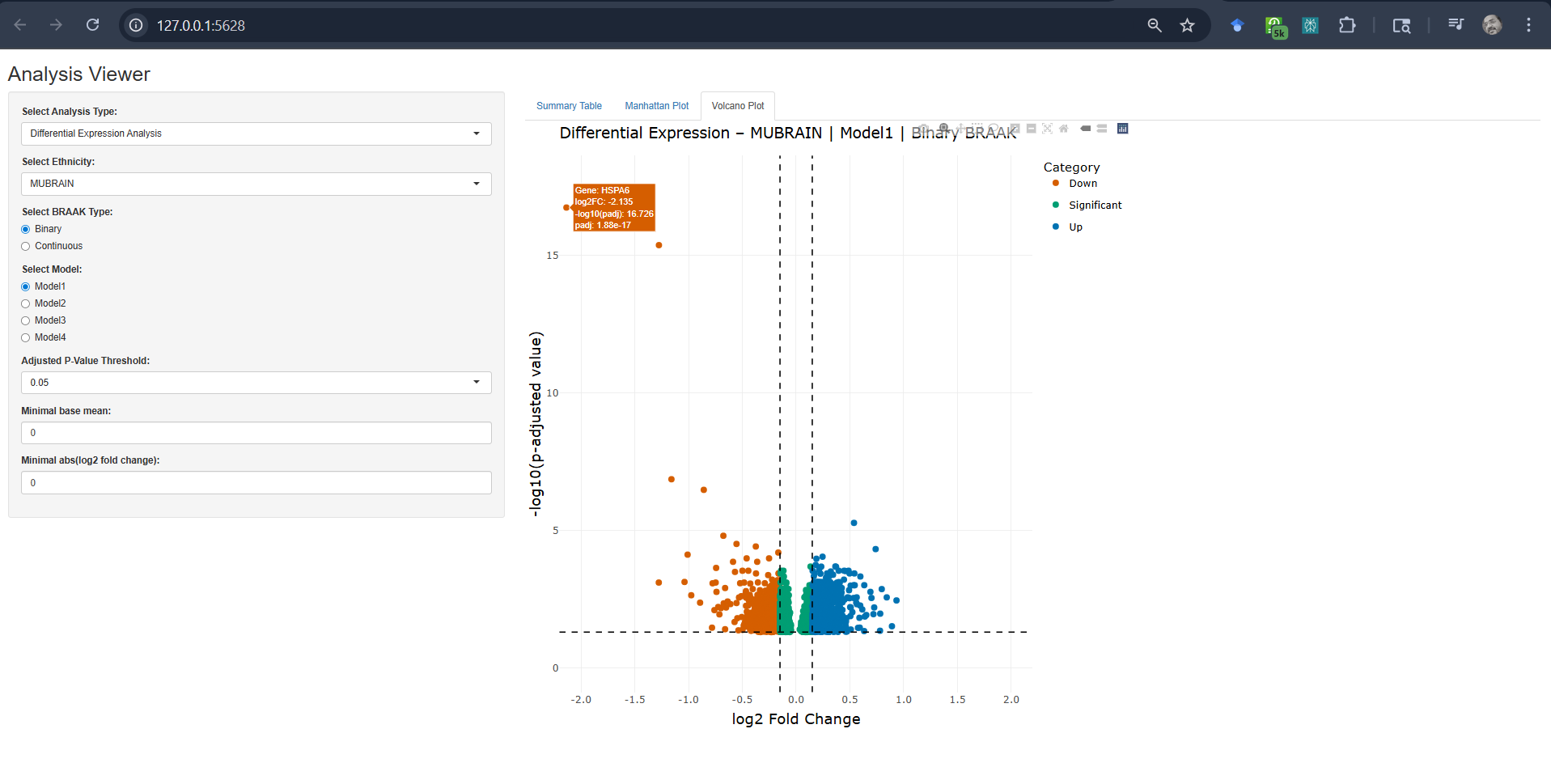
    • Differential Expression Analysis: Uses DESeq2 for robust transcriptomic profiling.
    • Interactive Data Exploration: Shiny-based web interface for data visualization.
    • Supports Ethnicity-Specific Analysis: Users can filter results by Hispanic and Non-Hispanic Whites (NHW) groups.
    • Advanced Visualization:
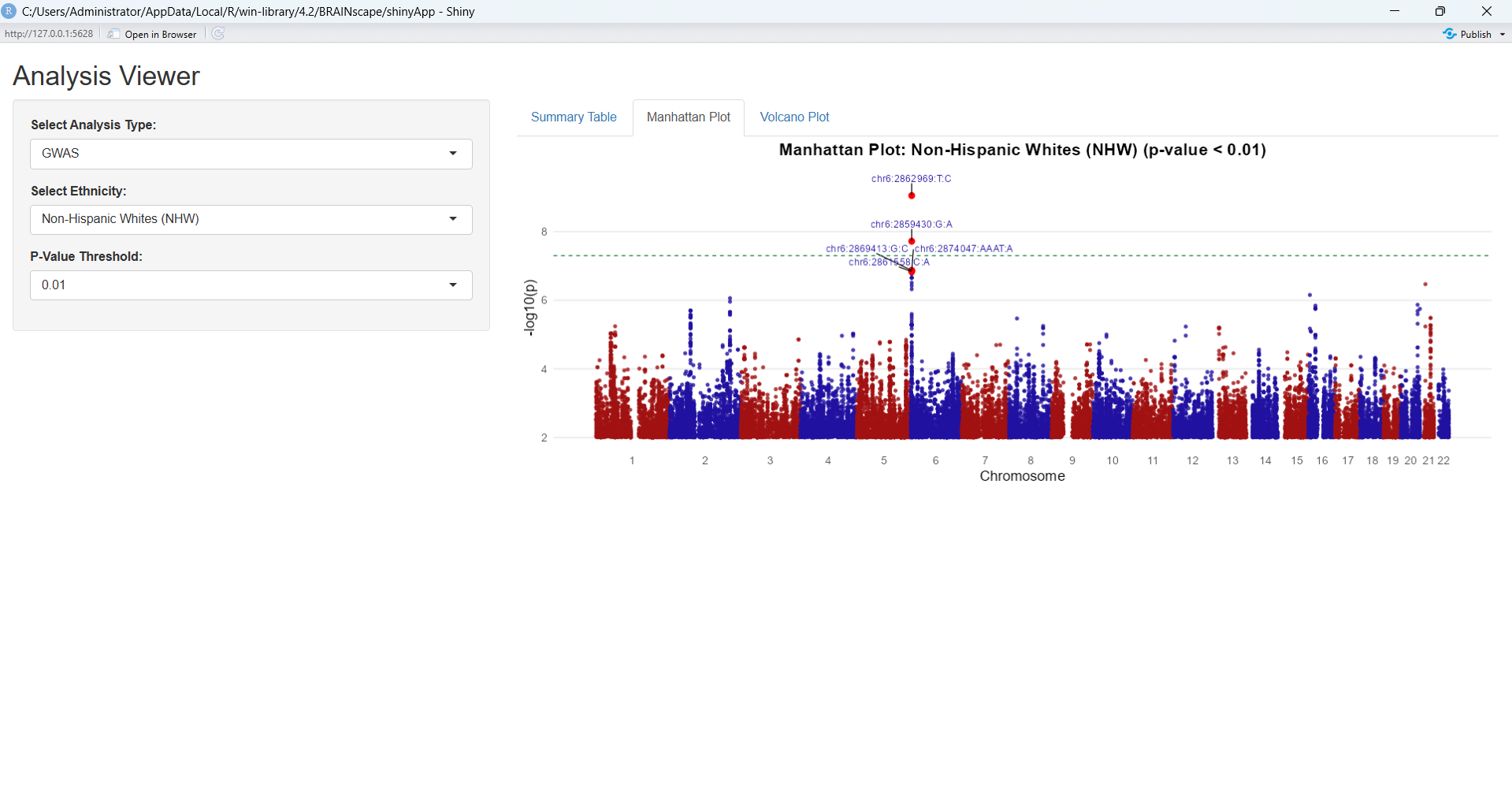
      • Manhattan Plots for eQTL results.
      • Volcano Plots for Differential Expression Analysis.

    Installation

    1. Install the dependencies: shiny, ggplot2, CMplot, dplyr using install.packages(c("shiny", "ggplot2", "CMplot", "dplyr", "DT", "plotly", "ggrepel"))
    2. To install BRAINscape, first download the source file from zenodo and then install it using the following command:
    install.packages("BRAINscape_1.0.0.tar.gz", repo=NULL, type="source")

    Usage

    library(BRAINscape)
    BRAINscape::launchApp()

    Example Workflow

    1. Load and Explore eQTL Data

    Select Ethinicity : Hispanics or Non-Hispanic Whites (NHW)
    Select Analysis Type: eQTL
    Select eQTL Type: cis or trans
    Adjust Nominal P-value Threshold
    
    # Example: Parameter selection and visualization for eQTL analysis
    analysis_type <- "eQTL"
    ethnicities <- "Non-Hispanic Whites (NHW)"
    eqtl_type <- "trans"
    gene <- "COLGALT2"
    p_threshold <- 0.05
    
    # Results will display Manhattan plots and interactive tables

    eQTL BRAINscape

    Note: Due to large data size, the trans-eQTL data will take some time (around 10-15 secs) to load and reflect in the Shiny GUI.

    2. Load and Explore Differential Expression Analysis Results

    Select Ethinicity : Hispanics or Non-Hispanic Whites (NHW) or MU-BRAIN
    Select Analysis Type: Differential Gene Expression
    Adjust Cutoff for p-value (adjusted), BaseMean, and Log2FoldChange
    
    # Example: Parameter selection and visualization for eQTL analysis
    analysis_type <- "Differential Expression Analysis"
    ethnicities <- "MUBRAIN"
    adjusted_p_threshold <- 0.05
    
    # Results will display volcano plot and interactive tables

    DESeq2 BRAINscape

    3. Load and Explore GWAS Analysis Results

    Select Ethinicity : Hispanics or Non-Hispanic Whites (NHW)
    Select Analysis Type: GWAS
    Adjust Nominal P-value Threshold
    
    # Example: Parameter selection and visualization for eQTL analysis
    analysis_type <- "GWAS"
    ethnicities <- "Non-Hispanic Whites (NHW)"
    p_threshold <- 0.05
    
    # Results will display volcano plot and interactive tables

    GWAS BRAINscape

    Data Sources

    • The BRAINscape package does not include raw data due to data sharing constraints.

    Citation

    If you use BRAINscape for your research, please cite:

    Yang, Z., Cieza, B., Reyes-Dumeyer, D., Lee, A., Ma, Y., Yilmaz, E., Lantigua, R., Miller, G.W., Brown, L.M., Honig, L. and Ciener, B., 2024. MU-BRAIN: MUltiethnic Brain Rna-seq for Alzheimer INitiative. bioRxiv, pp.2024-02.

    Ruhela, V., Basilio Cieza Huaman, Zikun Yang, & Giuseppe Tosto. (2025). BRAINscape (1.0.0). Genetics and Genomics (Zenodo). https://doi.org/10.5281/zenodo.17831756

    Contributing

    We welcome contributions! To contribute:

    1. Fork the repository.
    2. Make improvements.
    3. Submit a pull request.

    Support

    For issues and feature requests, please open a ticket on GitHub Issues.

    License

    This package is licensed under the Apache License. See LICENSE for details.


    BRAINscape: Unlocking the Genetics of the Brain.

    Visit original content creator repository
  • mk-knn

    Tema 3 – SDA

    de Alexandru Sima (312CA)


    Magic Keyboard

    Structura proiectului

    • mk – entry point-ul programului și loop-ul de citire a comenzilor
    • mk_functions – interogări în dicționar (autocorrect, autocomplete)
    • trie – implementarea structurii unui trie
    • trie_node – implementarea structurii interne dintr-un trie
    • utils – funcții ajutătoare

    Structuri de date folosite

    • trie – pentru a stoca cuvintele din dicționar și a facilita interogările

    Comenzi

    • INSERT <word> – Se inserează un cuvânt în dicționar.
    • LOAD <file> – Se încarcă cuvintele din fișierul dat ca argument.
    • REMOVE <word> – Se șterge un cuvânt din dicționar.
    • AUTOCORRECT <word> <max_letters> – Se caută în dicționar cuvintele de
      aceeași lungime cu word, care diferă prin cel mult max_letters litere și se
      afișează în ordine lexicografică. Se afișează “No words found!” dacă nu există
      niciun cuvânt care să îndeplinească condiția.
    • AUTOCOMPLETE <prefix> <mode> – Se completează prefixul cu cuvinte din
      dicționar, în funcție de mode. Se afișează “No words found!” dacă nu există
      niciun cuvânt care să înceapă cu prefix.
    • EXIT – Se golește dicționarul și se termină execuția programului.

    Funcționalitate

    • INSERT: Se inserează un cuvânt în dicționar, parcurgându-se literă cu
      literă, creându-se nodurile aferente dacă nu există, iar la nodul final se
      incrementează numărul de apariții ale cuvântului (inițial 0). La întoarcerea din
      inserție, se calculează pentru fiecare nod parcurs frecvența maximă și lungimea
      minimă a cuvintelor care se ramifică din acel nod, pentru a facilita
      interogările ulterioare.

    • LOAD: Se inserează toate cuvintele dintr-un fișier dat (vezi INSERT).

    • REMOVE: Se șterge un cuvânt din dicționar, parcurgându-se literă cu literă
      și setându-se numărul de apariții ale cuvântului 0. La întoarcere, se
      recalculează frecvența maximă și lungimea minimă a cuvintelor care se ramifică
      din noduri și se șterg nodurile care nu mai conduc către niciun cuvânt.

    • AUTOCORRECT: Se parcurge arborele până la nivelul corespunzător lungimii
      cuvântului inițial, încercându-se toate combinațiile de litere care conduc la
      cuvinte existente, în limita schimbărilor de litere disponibile. Se contorizează
      numărul de litere schimbate. Când se ajunge la nivelul corespunzător, dacă
      cuvântul curent este valid, se afișează. Modul de încercare a combinațiilor
      garantează că rezultatele vor fi în ordine lexicografică. În cazul în care
      niciun cuvânt nu este găsit, se afișează “No words found!”.

    • AUTOCOMPLETE:

    • Se parcurge arborele până la nodul corespunzător prefixului dat. Există 4
      moduri de autocomplete, dintre care 0 semnifică că se vor executa toate
      celelalte 3:

      • 1: Se afișează primul cuvânt (în ordine lexicografică). Pentru aceasta, se
        pleacă din prefix, se încearcă fiecare literă din alfabet și se avansează pe
        prima găsită (modul de construire a trie-ului garantează că toate literele
        disponibile duc la cuvinte existente). Se afișează primul cuvânt descoperit.
      • 2: Se afișează cel mai scurt cuvânt. Pentru aceasta, se pleacă din prefix,
        și se urmăresc nodurile care duc la o lungime minimă cu 1 mai mică decât cele
        curente. Se afișează primul cuvânt descoperit.
      • 3: Se afișează cel mai frecvent cuvânt. Pentru aceasta, se pleacă din
        prefix, se încearcă fiecare literă din alfabet și se urmăresc nodurile care
        duc la cuvinte cu aceeași frecvență maximă ca și cele curente. Se afișează
        primul cuvânt descoperit.
      • Pentru toate cele 3 moduri, dacă nu există niciun cuvânt care să
        îndeplinească condiția, se afișează “No words found!”.
    • Grație similarității modurilor de autocomplete, am implementat o singură
      funcție care primește în plus ca parametri 2 funcții:

      • O funcție de stop, care spune când se oprește căutarea;
      • O funcție de avansare, care spune cum se alege nodul următor în parcurgere.
    • EXIT: Se eliberează elementele stocate în trie și se termină execuția
      programului.


    KNN

    Structura proiectului

    • kNN – entry point-ul programului și loop-ul de citire a comenzilor
    • kNN_functions – interogări asupra datelor (range search și nearest
      neighbour)
    • array – implementarea structurii unui array list
    • bst – implementarea structurii unui arbore binar de căutare k-ar
    • point – implementarea structurii unui punct în spațiul k-dimensional
    • utils – funcții ajutătoare

    Structuri de date folosite

    • array list – pentru a stoca punctele găsite într-un query
    • bst k-ar – pentru a stoca punctele din spațiul k-dimensional

    Comenzi

    • LOAD <file> – încarcă datele din fișierul dat ca argument
    • NN <x1> <x2> ... <xk> – găsește cei mai apropiați vecini ai unui punct dat
      ca argument
    • RS <x1_start> <x1_end> <x2_start> <x2_end> ... <xk_start> <xk_end) – găsește
      toate punctele dintr-un anumit interval dat ca argument
    • EXIT – termină execuția programului, eliberând memoria alocată

    Funcționalitate

    • LOAD: Programul încarcă dintr-un fișier (primit ca argument al
      comenzii LOAD) punctele din spațiul k-dimensional și le stochează într-un
      arbore binar de căutare k-ar, cu proprietatea că ordinea stabilită între
      nodurile de pe nivelul i este dată de coordonata i % k a punctelor.

    • NN:

      • Pentru a determina cei mai apropiați vecini ai unui punct dat ca argument,
        se parcurge recursiv arborele, căutându-se frunza cea mai apropiată de punctul
        dat, folosindu-se ordinea stabilită de proprietatea arborelui.
      • La întoarcerea din recursivitate, se calculează distanța euclidiană între
        punctul curent și cel țintă, stabilindu-se dacă trebuie inserat în array-ul
        rezultat.
      • Dacă distanța minimă până în acest moment este mai mare decât distanța de la
        punctul curent la planul de separație determinat de coordonata i % k a
        părintelui, există posibilitatea să se afle un punct mai apropiat în
        subarborele frate, așa că se caută și în acela, inserându-se în array-ul
        rezultat dacă este cazul.
    • RS:

      • Pentru a determina punctele dintr-un anumit interval dat ca argument, se
        parcurge recursiv arborele, căutându-se nodurile care se află în intervalul
        dat. Pentru eficientizarea căutării, căutarea nu se mai face pe subarborii ai
        căror dimensiune de separație (i % k) nu se află în interval, deoarece
        niciun punct din acei subarbori nu poate fi în interval.
    • EXIT: Se eliberează elementele stocate în arbore și se termină execuția
      programului.

    Visit original content creator repository

  • MiKTMCSnakemakePipeline

    citation

    Much of this pipeline was inspired by https://github.com/snakemake-workflows and https://github.com/crazyhottomy. The fastq2jason.py script was modified from the original by https://github.com/crazyhottomy, but the Snakefile and modularized rules were inspired by https://github.com/snakemake-workflows. All Files in rules and scripts are my own work. If you use this pipeline, please cite Manninm/MiKTMCSnakemakePipeline

    How to use Pipeline

    Most of the specifics of the pipeline can be handled in the config.yaml file. The snakefile, rules and cluster.json SHOULD NOT BE EDITED BY HAND. If you absolutley need to edit cluster.json, I recommend https://jsoneditoronline.org/. Snakemake is very sensitive to syntax, and just saving a file in the wrong format can cause problems.

    Download the pipeline from Github or transfer the pipeline from my home directory on 76 server

    tar -xvf MiKTMCSnakemakePipeline.tar.gz
    mv -v MiKTMCSnakemakePipeline/* .
    rm -r MiKTMCSnakemakePipeline/

    Do dry run to check outputs and rules

    snakmake -npr -s Snakefile

    Make DAG or Rulegraph

    snakemake --forceall --rulegraph -s Snakefile | dot -Tpng > rulegrap.png
    snakemake --forceall --rulegraph -s Snakefile | dot -Tpdf > rulegrap.pdf
    snakemake --forceall --dag -s Snakefile | dot -Tpng > dag.png
    snakemake --forceall --dag -s Snakefile | dot -Tpdf > dag.pdf

    Run locally using 22 cores

    snakemake -j 22 -s Snakefile

    Run on Greatlakes and Slurm
    FYI, the –flags used in the snakemake command call must be somewhere in cluster.json, wwether under the default heading, or the rule heading. If –tasks-per-node is called in the command call, and only –tasks-per-cpu is in your default/rule heading, snakemake will complain that “Wildcards have no attribute…”

    snakemake -j 999 --cluster-config cluster.json --cluster 'sbatch --job-name {cluster.job-name} --ntasks-per-node {cluster.ntasks-per-node} --cpus-per-task {threads} --mem-per-cpu {cluster.mem-per-cpu} --partition {cluster.partition} --time {cluster.time} --mail-user {cluster.mail-user} --mail-type {cluster.mail-type} --error {cluster.error} --output {cluster.output}'

    The Workflow of Pipeline

    The workflow is as seen below

    The pipeline expects a directory format as the below example
    CAUTION Four or more samples must be included, or the PCA scripts will break. It expects pair-end reads. To my knowledge, the pipeline will not accomodate single-end reads.

    RNAseqTutorial/
    ├── Sample_70160
    │   ├── 70160_ATTACTCG-TATAGCCT_S1_L001_R1_001.fastq.gz
    │   └── 70160_ATTACTCG-TATAGCCT_S1_L001_R2_001.fastq.gz
    ├── Sample_70161
    │   ├── 70161_TCCGGAGA-ATAGAGGC_S2_L001_R1_001.fastq.gz
    │   └── 70161_TCCGGAGA-ATAGAGGC_S2_L001_R2_001.fastq.gz
    ├── Sample_70162
    │   ├── 70162_CGCTCATT-ATAGAGGC_S3_L001_R1_001.fastq.gz
    │   └── 70162_CGCTCATT-ATAGAGGC_S3_L001_R2_001.fastq.gz
    ├── Sample_70166
    │   ├── 70166_CTGAAGCT-ATAGAGGC_S7_L001_R1_001.fastq.gz
    │   └── 70166_CTGAAGCT-ATAGAGGC_S7_L001_R2_001.fastq.gz
    ├── scripts
    ├── groups.txt
    └── Snakefile

    The pipeline uses two types of annotation and feature calling for redundancy in the event that one pipeline fails/gives ‘wonky’ results
    Upon initiating the snakemake file, the snakemake preamble will check fastq file extensions (our lab uses .fq.gz for brevity) and change any fastq.gz to fq.gz. The preamble will then generate a samples.json file using fastq2json.py. You should check samples.json and makesure it is correct because the rest of the pipeline uses this file to create wildcars, which is the driving force behind snakemake.
    If no groupfile (groups.txt) was provided, the preample will generate one for you. This file is necessary to run ballgown as well as the PCA plots. This should also be checked for errors. If you provide your own groups.txt, it should be in the format below

    Directory       Samples Disease Batch
    Sample_70160/   Sample_70160    Sample  Batch
    Sample_70161/   Sample_70161    Sample  Batch
    Sample_70162/   Sample_70162    Sample  Batch
    Sample_70166/   Sample_70166    Sample  Batch

    The directory and sample names should correspond and be in the order as they appear in the directory. The sample and batch columns can be used to designate phenotype data and any batchs you may have. If you have varying ‘Disease’ types, you can then use this file for differential expression and use the batch column to correct for batch affects. The PCA plotting scripts will plot Disease types in different colors, and different Batchs with different shapes

    I have attempted to make this pipeline as streamlined and automatic as possible. It could incorporate differential expression, but I feel that the pipeline completes sufficient tasks for review before Differetial Analysis. In the even that a cohort has Glom and Tub samples, it would be wise to run each separately in their own pipeline. Adding another child directory would be more difficult to code rules for. If there are any plots, qc tools or metrics that you use in your personal analysis, those can be integrated upon request.

    Visit original content creator repository

  • Online-Offline-Budget-Tracker

    Unit 18 PWA Homework: Online/Offline Budget Trackers

    Add functionality to our existing Budget Tracker application to allow for offline access and functionality.

    The user will be able to add expenses and deposits to their budget with or without a connection. When entering transactions offline, they should populate the total when brought back online.

    Offline Functionality:

    • Enter deposits offline

    • Enter expenses offline

    When brought back online:

    • Offline entries should be added to tracker.

    The application is deployed to Heroku and can be installed as a progressive web app through your browser here:

    Click on the link to checkout the Web application – OnlineOfflineBudgetTracker.herokuapp.com

    Gif

    User Story

    AS AN avid traveller
    I WANT to be able to track my withdrawals and deposits with or without a data/internet connection
    SO THAT my account balance is accurate when I am traveling

    Business Context

    Giving users a fast and easy way to track their money is important, but allowing them to access that information anytime is even more important. Having offline functionality is paramount to our applications success.

    Acceptance Criteria

    GIVEN a user is on Budget App without an internet connection
    WHEN the user inputs a withdrawal or deposit
    THEN that will be shown on the page, and added to their transaction history when their connection is back online.


    Commit Early and Often

    • One of the most important skills to master as a web developer is version control. Building the habit of committing via Git is important for two reasons:
    1. Your commit history is a signal to employers that you are actively working on projects and learning new skills

    2. Your commit history allows you to revert your code base in the event that you need to return to a previous state

    • Follow these guidelines for committing:

      • Make single purpose commits for related changes to ensure a clean, manageable history. If you are fixing two issues, make two commits

      • Write descriptive, meaningful commit messages so that you and anyone else looking at your repository can easily understand its history

      • Don’t commit half done work, for the sake of your collaborators (and your future self!)

      • Test your application before you commit to ensure functionality at every step in the development process

    • We would like you to have well over 200 commits by graduation, so commit early and often!

    • Deploy your application with Heroku and MongoDB Atlas.

    Submission on BCS

    • You are required to submit the following:

      • the URL to the deployed application

      • the URL to the Github repository

    Visit original content creator repository

  • AUV-Simulator

    AUV-Simulator

    Screenshot

    A simulator used to test control algorithms written for an Autonomous Underwater Vehicle

    This simulator was developed as a part of my work in Team Tiburon, the autonomous underwater vehicle team of NIT Rourkela. It is developed using Unity3D and written in C#.

    The simulator works by communicating with a control algorithm through TCP sockets. The control algorithm may run on a seperate machine.

    The simulator receives from the control algorithm, the values of the forces to be applied to the individual thrusters. It send simulated sensor data to the control algorithm as feedback. Amongst the sensors used are cameras. Camera images are sent to the control algorithm every frame. To ensure optimal communication frequency, edge detection is performed on the images before sending.

    The code for simulating underwater forces like planing force, slamming force etc., i.e. the contents of ./Underwater Forces, is experimental and not currently in use. This code was taken from the tutorial posted by Erik Nordeus, ‘Make a realistic boat in Unity with C#’, and all rights for that part of the code belong to him.

    http://www.habrador.com/tutorials/unity-boat-tutorial/

    To use:

    • Once the IP addresses and Port numbers are set correctly, run the simulator. Then, run the control algorithm, set up a client connection to the simulator, and run its server. Finally, press the space bar on the simulator to set up its client connection with the control algorithm.
    • The control algorithm must send to the simulator forces to be applied at each thruster, as float values. The number, position, and orientation of thrusters on the vehicle can easily be changed.
    • The simulator provides simulated sensor values as feedback. A total of 8 floating point values are sent, with two digit decimal places, three digits before the decimal, and the sign. This is mentioned for easy decoding of the feedback. The eight values are: the orientation of the vehicle in the x, y, and z axes respectively, the acceleration of the vehicle in the x, y, and z axes respectively, the depth of the vehicle under water, and the forward velocity of the vehicle in its local frame.
    • To use camera images as feedback, uncomment the like ‘#usePics’ in ControlThrusters.cs. You must decode the image from the values of the edges.

    steps:
    Add these dependencies if not added
    ROS Qt Build – sudo apt-get install ros-kinetic-qt-build
    Point Grey Camera Driver – sudo apt-get install ros-kinetic-pointgrey-camera-driver
    Install rosbridge-sudo apt-get install ros-kinetic-rosbridge-server

    Install AUV Simulator using the installer available in Builds.zip.

    start AUV simulator.exe
    enter the IP address

    run the command roslaunch rosbridge_server rosbridge_websocket.launch
    *(pre-requisite rosbridge library should be installed on your linux distribution )

    run rosun watchdog watchdog

    run simulator_receive_image simulator_receive_image

    in AUV simulator.exe : *IN THE MENU YOU CAN TYPE THE IP ADDRESS OR JUST CLICK ON THE LOCAL HOST BUTTON FOR SETTING UP THE WEBSOCKET CONNECTION.

    *USE MOUSE AND ARROW KEYS TO MOVE AROUND THE ARENA.

    *TO VIEW THE LOG VIEWER/CONSOLE LOGS ,USING MOUSE- CLICK AND DRAG TO MAKE A CIRCULAR GESTURE.

    Visit original content creator repository

  • netPI-raspbian

    Raspbian

    Made for Raspberry Pi 3B architecture based devices and compatibles

    Docker repository

    https://hub.docker.com/r/hilschernetpi/netpi-raspbian/

    Container features

    The image provided hereunder deploys a Debian based container with SSH server, pre-compiled software/packages found installed on Raspbian OS (inclusive userland tools) and a default user which is pi.

    Base of this image builds debian with enabled SSH, installed userland tools, created user ‘pi’ and preinstalled packages of a Raspbian lite operating system (headless).

    Container hosts

    The container has been successfully tested on the following hosts

    • netPI, model RTE 3, product name NIOT-E-NPI3-51-EN-RE
    • netPI, model CORE 3, product name NIOT-E-NPI3-EN
    • netFIELD Connect, product name NIOT-E-TPI51-EN-RE/NFLD
    • Raspberry Pi, model 3B
    • Raspberry Pi, model 4B (arm32v7,arm64v8)

    netPI devices specifically feature a restricted Docker protecting the Docker host system software’s integrity by maximum. The restrictions are

    • privileged mode is not automatically adding all host devices /dev/ to a container
    • volume bind mounts to rootfs is not supported
    • the devices /dev,/dev/mem,/dev/sd*,/dev/dm*,/dev/mapper,/dev/mmcblk* cannot be added to a container

    Container setup

    Environment variable (optional)

    The container binds the SSH server port to 22 by default.

    For an alternative port use the variable SSHPORT with the desired port number as value.

    Network mode

    The container supports the bridged or host network mode. More details at Container networking.

    Bridged

    Any unused Docker host port needs to be mapped to the default container port 22 or the one set by SSHPORT to expose the container SSH server to the Docker host.

    Remark: Container bluetooth functionality is supported in host network mode only.

    Host

    Port mapping is unnecessary since all the used container ports (like 22 or SSHPORT) are exposed to the host automatically.

    Remark: Host network mode is mandatory for using container bluetooth functions.

    Hostname (optional)

    For an equal default Raspbian OS hostname set the container hostname to raspberrypi.

    Privileged mode (optional)

    The privileged mode lifts the standard Docker enforced container limitations: applications inside a container are getting (almost) all capabilities as if running on the host directly.

    Enabling the privileged mode is optional but mandatory for the following container functions:

    • bluetooth
    • userland tools

    Host devices (optional)

    For bluetooth functionality the /dev/ttyAMA0 Docker host device needs to be added to the container. In conjunction the /dev/vcio Docker host device needs be added to the container as well to allow bluetooth controller resets.

    For using userland tools like vcmailbox the /dev/vcio and /dev/vchiq and /dev/vc-mem Docker host devices need to be added to the container.

    Container deployment

    Pulling the image may take 10 minutes.

    netPI example

    STEP 1. Open netPI’s web UI in your browser (https).

    STEP 2. Click the Docker tile to open the Portainer.io Docker management user interface.

    STEP 3. Enter the following parameters under Containers > + Add Container

    Parameter Value Remark
    Image hilschernetpi/netpi-raspbian a :tag may be added as well
    Network > Network bridge or host use either or
    Network > Hostname raspberrypi optional
    Restart policy always
    Adv.con.set. > Env > +add env.var. name SSHPORT -> value any number value optional for different SSH port
    Port mapping host unused port -> container 22 / SSHPORT in bridged mode only
    Adv.con.set. > Devices > +add device Host path /dev/ttyAMA0 -> Container path /dev/ttyAMA0 optional for bluetooth
    Adv.con.set. > Devices > +add device Host path /dev/vcio -> Container path /dev/vcio optional for bluetooth, userland tools
    Adv.con.set. > Devices > +add device Host path /dev/vchiq -> Container path /dev/vchiq optional for userland tools
    Adv.con.set. > Devices > +add device Host path /dev/vc-mem -> Container path /dev/vc-mem optional for userland tools
    Adv.con.set. > Privileged mode On optional for bluetooth, userland tools

    STEP 4. Press the button Actions > Start/Deploy container

    Docker command line example

    docker run -d --privileged --network=host --restart=always -e SSHPORT=22 --device=/dev/ttyAMA0:/dev/ttyAMA0 --device=/dev/vcio:/dev/vcio --device=/dev/vchiq:/dev/vchiq --device=/dev/vc-mem:/dev/vc-mem -p 22:22/tcp hilschernetpi/netpi-raspbian

    Docker compose example

    A docker-compose.yml file could look like this

    version: "2"
    
    services:
     nodered:
       image: hilschernetpi/netpi-raspbian
       restart: always
       privileged: true
       network_mode: host
       ports:
         - 22:22
       devices:
         - "/dev/ttyAMA0:/dev/ttyAMA0"
         - "/dev/vcio:/dev/vcio"
         - "/dev/vchiq:/dev/vchiq"
         - "/dev/vc-mem:/dev/vc-mem"
       environment:
         - SSHPORT=22
    

    Container access

    The container starts the SSH server automatically when deployed.

    For an SSH terminal session use an SSH client such as putty with the Docker host IP address (@port number 22 or SSHPORT or bridge mode mapped one).

    Use the credentials pi as user and raspberry as password when asked and you are logged in as non-root user pi.

    Continue to use Linux commands in the terminal as usual.

    Container on Youtube

    Tutorial

    License

    Copyright (c) Hilscher Gesellschaft fuer Systemautomation mbH. All rights reserved.
    Licensed under the LISENSE.txt file information stored in the project’s source code repository.

    As with all Docker images, these likely also contain other software which may be under other licenses (such as Bash, etc from the base distribution, along with any direct or indirect dependencies of the primary software being contained).
    As for any pre-built image usage, it is the image user’s responsibility to ensure that any use of this image complies with any relevant licenses for all software contained within.

    N|Solid Hilscher Gesellschaft fuer Systemautomation mbH www.hilscher.com

    Visit original content creator repository

  • tabnine-swift-arduino

    TabNine For Swift for Arduino

    This repository is a placeholder, used to gauge the level of interest of Swift for Arduino users in a TabNine extension.

    TabNine Overview:


    This is the Swift for Arduino TabNine client, advanced AI based autocomplete for all programming languages. TabNine Indexes your entire project by reading your .gitignore or others, and determines which files to index.

    • Enter long variable names using minimal keystrokes and leverage a mnemonic completion engine.
    • Zero configuration. TabNine works out of the box.
    • Highly responsive: Produces a list of suggestions in less than 10 milliseconds on average.

    TabNine is part of Codota

    Deep Completion:


    Deep TabNine is trained on around 2 million files from GitHub. During training,
    TabNine’s goal is to predict the next token given the tokens that came before.
    To achieve this goal, TabNine learns complex behaviour, such as type inference
    in dynamically typed languages.

    Deep TabNine can use subtle clues that are difficult for traditional tools to access. For example,
    the return type of app.get_user()is assumed to be an object
    with setter methods, while the return type of app.get_users() is assumed to be a list.

    Deep TabNine is based on GPT-2, which uses the Transformer network architecture. This architecture was first developed to solve problems in natural language processing. Although modelling code and modelling natural language might appear to be unrelated tasks, modelling code requires understanding English in some unexpected ways.

    TabNine Deep Cloud:


    TabNine requires consumption of memory resources when being run locally on your computer. It may incur some latency that is not optimal to all PC’s. With that in mind, TabNine has developed a Cloud solution, called TabNine Deep Cloud.

    We understand that users concerned with their privacy prefer to keep their code on their own machine. Rest assured that we’re taking the following steps to address this concern:
    For individual developers, we are working on a reduced-size model which can run on a laptop with reasonable latency. Update: we’ve released TabNine Local.
    For enterprise users, we will soon roll-out the option to license the model and run it on your own hardware. We can also train a custom model for you which understands the unique patterns and style within your codebase. If this could be relevant to you or your team, we would love to hear more about your use case at enterprise@tabnine.com.
    Enabling TabNine Deep Cloud sends small parts of your code to our servers to provide GPU-accelerated completions.
    Other than for the purpose of fulfilling your query, your data isn’t used, saved or logged in any way.

    You can enable TabNine Deep Cloud for free by signing up TabNine Professional

    You can read more about Deep Completion

    Frequently Asked Questions:


    Is TabNine simple to use?

    TabNine works for all programming languages.
    TabNine does not require any configuration in order to work.
    TabNine does not require any external software (though it can integrate with it).
    Since TabNine does not parse your code, it will never stop working because of a mismatched bracket.

    Will TabNine leak my source code?

    By default, TabNine makes web requests only for the purposes of downloading updates and validating registration keys. In this case your code is not sent anywhere, even to TabNine servers.
    You may opt in to TabNine Deep Cloud, which allows you to use TabNine’s servers for GPU-accelerated completions powered by a deep learning model. If sending code to a cloud service is not possible, we also offer a self-hosted option.
    Contact us at enterprise@tabnine.com.

    Note:


    A note on licensing: this repo includes source code as well as packaged TabNine binaries. The MIT license only applies to the source code, not the binaries. The binaries are covered by the TabNine End User License Agreement.

    Visit original content creator repository

  • elderjs

    Elder.js

    Elder.js: an SEO first Svelte Framework & Static Site Generator


    Elder.js is an opinionated static site generator and web framework built with SEO in mind. (Supports SSR and Static Site Generation.)

    Features:

    • Build hooks allow you to plug into any part of entire page generation process and customize as needed.
    • A Highly Optimized Build Process: that will span as many CPU cores as you can throw at it to make building your site as fast as possible. For reference Elder.js easily generates a data intensive 18,000 page site in 8 minutes using a budget 4 core VM.
    • Svelte Everywhere: Use Svelte for your SSR templates and with partial hydration on the client for tiny html/bundle sizes.
    • Straightforward Data Flow: By simply associating a data function in your route.js, you have complete control over how you fetch, prepare, and manipulate data before sending it to your Svelte template. Anything you can do in Node.js, you can do to fetch your data. Multiple data sources, no problem.
    • Community Plugins: Easily extend what your Elder.js site can do by adding prebuilt plugins to your site.
    • Shortcodes: Future proof your content, whether it lives in a CMS or in static files using smart placeholders. These shortcodes can be async!
    • 0KB JS: Defaults to 0KB of JS if your page doesn’t need JS.
    • Partial Hydration: Unlike most frameworks, Elder.js lets you hydrate just the parts of the client that need to be interactive allowing you to dramatically reduce your payloads while still having full control over component lazy-loading, preloading, and eager-loading.

    Context

    Elder.js is the result of our team’s work to build this site (ElderGuide.com) and was purpose built to solve the unique challenges of building flagship SEO sites with 10-100k+ pages.

    Elder Guide Co-Founder Nick Reese has built or managed 5 major SEO properties over the past 14 years. After leading the transition of several complex sites to static site generators he loved the benefits of the JAM stack, but wished there was a better solution for complex, data intensive, projects. Elder.js is his vision for how static site generators can become viable for sites of all sizes regardless of the number of pages or how complex the data being presented is.

    We hope you find this project useful whether you’re building a small personal blog or a flagship SEO site that impacts millions of users.

    Project Status: Stable

    Elder.js is stable and production ready.

    It is being used on ElderGuide.com and 2 other flagship SEO properties that are managed by the maintainers of this project.

    We believe Elder.js has reached a level of maturity where we have achieved the majority of the vision we had for the project when we set out to build a static site generator.

    Our goal is to keep the hookInterface, plugin interface, and general structure of the project as static as possible.

    This is a lot of words to say we’re not looking to ship a bunch of breaking changes any time soon, but will be shipping bug fixes and incremental changes that are mostly “under the hood.”

    The ElderGuide.com team expects to maintain this project until 2023-2024. For a clearer vision of what we mean by this and what to expect from the Elder.js team as far as what is considered “in scope” and what isn’t, please see this comment.

    Getting Started:

    The quickest way to get started is to get started with the Elder.js template using degit:

    npx degit Elderjs/template elderjs-app
    
    cd elderjs-app
    
    npm install # or "yarn"
    
    npm start
    
    open http://localhost:3000

    This spawns a development server, so simply edit a file in src, save it, and reload the page to see your changes.

    Here is a demo of the template: https://elderjs.pages.dev/

    To Build/Serve HTML Locally:

    npm run build

    Let the build finish.

    npx sirv-cli public

    Full documentation here: https://elderguide.com/tech/elderjs/

    Visit original content creator repository